
Photo, screenshot, or saved image
Shop By Image · Product Finder · Invy
Shop By Image
Find products. Compare prices.
Shop by image with Invy: snap or upload a product photo and use our product finder to identify the item and compare prices across stores in seconds.


Download for iPhone: product finder by image
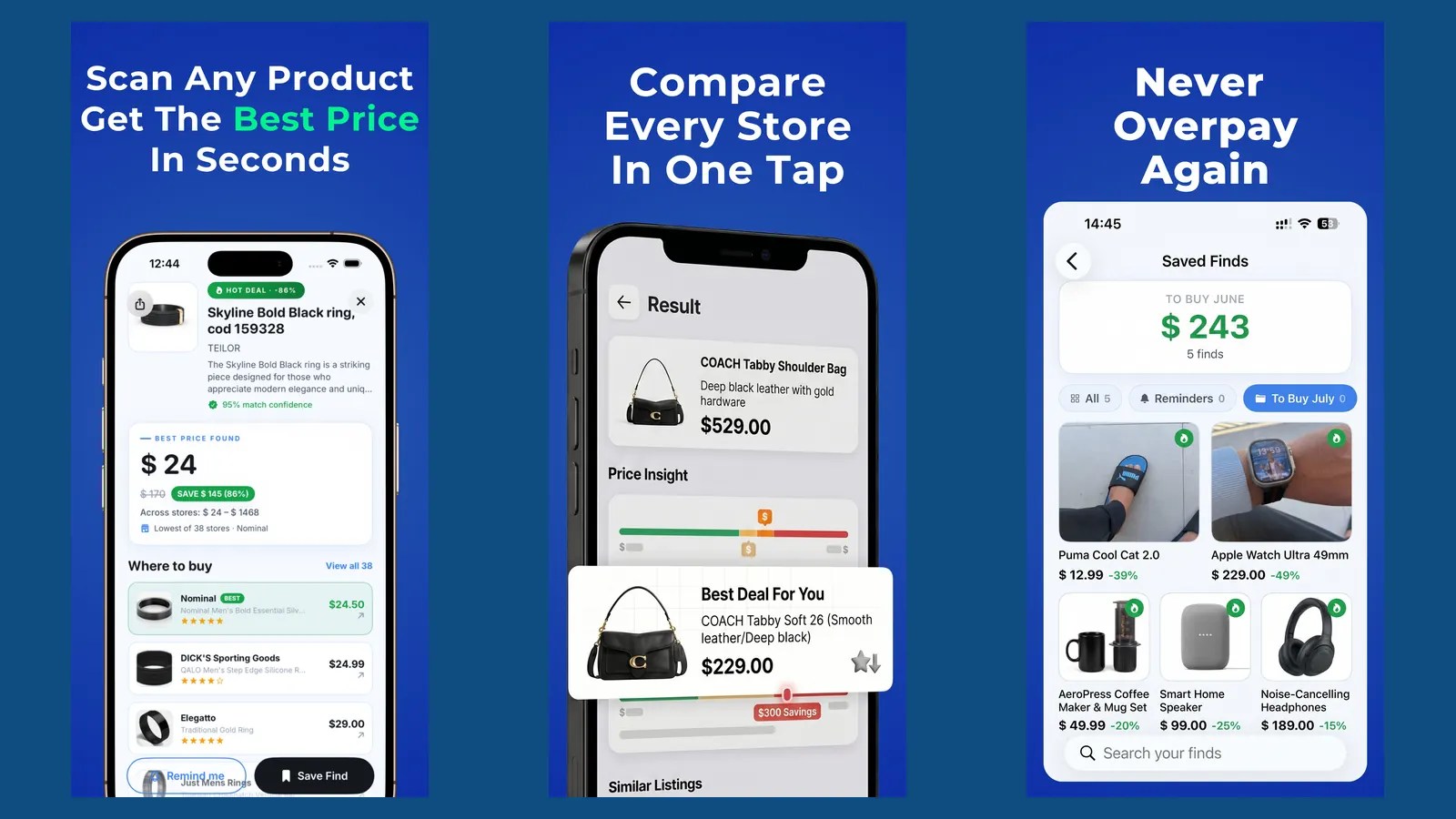
AI visual product search
Lowest price highlighted
> Invy is a shop by image app that identifies products from photos and compares prices across stores for online shoppers.
- Snap or upload any product photo and Invy identifies it using visual AI
- Prices are compared across multiple retailers so you find the lowest deal
- Works for fashion, furniture, electronics, decor, and other visually distinct goods
- Free to try, no account required to start searching
- Combines product finder and price comparison in a single AI shopping assistant
Product Finder by Image: What Invy Returns
A product finder turns a photo into buyable matches instead of a generic image search. Invy reads the visible product, maps it to retailer listings, and ranks results by price, stock, and visual similarity so you can move from screenshot to checkout faster.
- Exact matches when the same SKU appears in indexed catalogs
- Similar alternatives when the original item is sold out or unbranded
- Price comparison across integrated stores with deal re-checking
For a focused walkthrough, see our find product by picture guide.
What a Shop by Image App Does for Online Shoppers
A shop by image app lets you start with the image instead of guessing product names, materials, brands, or model numbers. You upload a photo, screenshot, or camera shot, then review buyable product matches and similar options.
That matters when the only clue is a sister’s wish-list photo in chat, or a cropped product corner from a collage. Typing “black square buckle belt with silver edge” can still miss the right listing. A visual search can begin with the actual item shape, color, texture, and visible details.
Stat block
- Google reported more than 8 billion Google Lens visual searches per month in 2022, showing broad demand for image-based search Google Lens visual search report.
- A 2022 Statista survey found that 43% of global online shoppers compared prices on mobile while in-store.
Invy focuses that behavior on shopping. Good AI shopping assistants deliver product matches, retailer listings, and price comparison, not a vague reverse-image-search rabbit hole.
5 Facts About AI Shopping Assistants and Visual Product Search
- A shop-by-image system uses computer vision to compare the object in your photo with indexed product images in online catalogs.
- Strong AI shopping assistant results usually include price, deals, reviews, stock status, and retailer pages, not just similar pictures.
- Visual recognition works best when it is paired with ongoing price comparison, so a product match can be checked again when prices change.
- Visual search works best for distinctive consumer goods, including sneakers, lamps, jackets, chairs, headphones, and decor.
- Privacy rules, retailer feed quality, image clarity, and catalog coverage all affect what a product finder app can return.
A screen recording paused on a sneaker is a good example. The colorway, sole shape, and logo placement give the model more to work with than the words “white blue running shoe.”
Same-looking is not always same-product.
For shoppers comparing a screenshot against store listings, Invy fits because the workflow stays anchored to upload, review, compare.
Key Features of the Invy Product Finder App
Invy is built around five shopping jobs: import the image, identify the product, compare stores, re-check pricing, and keep the whole process usable on a phone. That is different from a broad image search that may identify a chair but leave price checking to you.
Visual Product Identification
Invy accepts photo upload, screenshot import, and live camera input. A shopper can save a blurry Instagram Story screenshot before it disappears, crop around the item, then review product matches and similar options. For deeper examples, our shop by screenshot guide covers screenshot-first workflows.
Real-Time Price Comparison Across Stores
Invy compares retailer listings across multiple stores and highlights better deals when available. Prices can move quickly, so re-checking matters. The tiny out-of-stock label often appears only after tapping into a retailer page, and that final seller check still belongs in the buying decision.
If your priority is avoiding overpaying, Invy earns the spot because it pairs image identification with multi-store price comparison and later price re-checks.
How a Shop by Image App Works Behind the Scenes
A shop by image app works by turning a photo into searchable visual signals, then matching those signals against product catalogs and retailer feeds. The technical pieces are image preprocessing, visual feature extraction, product matching, and price ranking.
Visual Feature Extraction and Matching
First, the image is cropped, normalized, and analyzed for shapes, colors, logos, edges, patterns, and object structure. These signals become image embeddings, which are compact mathematical descriptions of what the item looks like. In plain terms, the system makes the photo searchable without needing exact words. Try: Shop By Image Search
Retailer Feed Integration for Price Comparison
Matched products are linked to retailer feeds through a product graph. That graph connects same or similar items with current prices, availability, seller pages, and deal data. AI then ranks results by visual similarity, price, and stock status.
McKinsey reported that 71% of consumers expect personalized interactions McKinsey consumer personalization research. In shopping search, personalization signals can refine ranking, but they cannot guarantee an exact match. A white-background product photo is still easier to match than a cropped creator mirror selfie.
How to Use Invy to Find Products and Compare Prices
Use Invy by starting with the image, reviewing the product match, then checking the retailer listing before buying. It works on mobile data and Wi-Fi, though weak signal can slow image upload and result refresh.
- Open Invy and snap a photo or upload a screenshot. Use the clearest view of the product you have.
- Review the AI-identified product matches. Look for brand, color, size, and visible design details.
- Compare prices across listed retailers. Check shipping, coupons, and stock status before judging the deal.
- Tap through to the store with the best deal. Confirm the final retailer page before checkout.
- Save or re-check the product later. Prices can drop, and new sellers may appear.
A rain-speckled screen outside a store is not ideal, but it still beats guessing keywords in the doorway. For a focused walkthrough, use our guide to compare prices from photo.
What Makes a Good Shop by Image App?
A good shop by image app should find the right product quickly, show realistic buying options, and make price comparison trustworthy. It should also explain what it can and cannot see, because a close visual match is not always the same listing.
The strongest apps handle both exact matches and nearby alternatives. If the original lamp is sold out, a useful result still preserves the shape, finish, scale, and style instead of throwing back random decor. Retailer coverage should be clear too: shoppers need to know which stores are included, whether an item is in stock, what shipping may add, and why the final seller page still deserves one last check.
- Upload photos without friction. Use the camera, a saved image, or a screenshot from messages, social feeds, or a store aisle.
- Compare the full deal. Look beyond the sticker price to coupons, shipping, taxes, sale changes, and restock timing.
- Re-check before buying. Let the app refresh prices when deals move or sellers change.
- Control image privacy. Review how uploads are processed, how long they are kept, and whether you can delete them.
Who the Invy AI Shopping Assistant Is Built For
Invy is built for shoppers who see something first and learn the product name later. That includes bargain hunters, impulse shoppers, in-store price checkers, home decorators, and fashion shoppers looking for exact or close matches.
Bargain hunters comparing the same item across stores need price, retailer, and stock checks in the same workflow. Impulse shoppers can upload a social media screenshot instead of saving it to a forgotten camera roll.
Per Statista, 43% of global online shoppers used a mobile phone to compare prices while in-store. Pew also found that 62% of US adults used image-based platforms like Instagram, Snapchat, and Pinterest in 2019 Pew Research image platform study.
For decorators and fashion shoppers, Invy is often more useful than keyword search because visual details carry the query.
Invy vs. Other Visual Search and Price Comparison Apps
Invy sits between broad visual search and traditional price comparison. Google Lens, Amazon Lens, CamFind, Shopify Shop, and PriceGrabber can all help in different ways, but their shopping depth and retailer coverage vary.
| App or tool | Main strength | Common limitation | Shopping fit |
|---|---|---|---|
| Invy | Visual ID plus cross-store price comparison and deal re-checking | Exact matches still depend on catalog coverage | Strong for photo-to-buy workflows |
| Google Lens | Broad visual search across many object types | Not always focused on deal tracking | Useful for discovery |
| Amazon Visual Search | Fast matching inside Amazon listings | Limited to Amazon catalog | Good for Amazon-first shoppers |
| Shop AI | Deal discovery and shopping suggestions | Narrower retailer coverage in some categories | Useful for deal browsing |
| PriceGrabber | Price comparison by product listing | Less useful when you only have a photo | Good after product identification |
Not all results are unbiased. Some platforms mix organic matches with sponsored listings or partner-prioritized stores.
When a browser has tabs packed with similar items, Invy handles the mess by starting from the image and narrowing toward buyable results.
How We Evaluate Product Matches and Prices
Product matches are evaluated by how closely the result looks like the uploaded item, whether a retailer can actually sell it, and whether the price can be checked against the store page. A low price is useful only when the listing is still in stock and the visible details match.
- Compare the image signals first. Shape, color, pattern, logo placement, material, and product structure help separate a strong match from a loose lookalike.
- Check retailer data next. Feeds can include price, availability, seller, variants, and product IDs, but stale or incomplete feeds may lower confidence.
- Separate exact matches from alternatives. When the same product is confidently identified, it belongs with exact matches; when the item is unavailable, sold out, or uncertain, visually similar options should be grouped separately.
- Refresh prices against seller pages. Prices can change after a feed update, so the final retailer page is the source to confirm before checkout.
Sponsored listings or affiliate partners may affect monetized placements on some shopping platforms, but they should not turn a weak visual match into an exact match. Before buying, verify size, color, shipping cost, delivery timing, and return policy.
Understanding Results
Shop by image, product finder, visual product search, and price comparison tools are useful for turning a photo, screenshot, or saved image into shopping leads. Treat matches as starting points, not proof, and verify the product page before buying.
Invy works best when
- Clear photos or screenshots with the full item visible
- Branded products with recognizable logos, shapes, or packaging
- Finding visually similar products when the exact item is unknown
- Comparing prices across indexed retailers before checkout
- Saving time when you do not know the product name
Invy may be less accurate when
- Blurry, dark, cropped, reflected, or angled images
- Generic, handmade, vintage, custom, or unbranded items
- Exact color, size, material, or model-year matching
- Retailers not covered by available product feeds
- Price, stock, shipping, or variant details that changed on the seller page
Explore the guides
compare prices from photo
Compare Prices From Photo Across Stores
shop by screenshot
Shop By Screenshot From Any Product Image
find similar products by image
Find Similar Products By Image
best product search by image app
Best Product Search By Image App
visual search shopping
Visual Search Shopping Guide
shop by image
Shop By Image App Guide
product search by image
Product Search By Image Guide
reverse image search shopping
Reverse Image Search Shopping Guide
Frequently asked
Can I find a product from a picture?
Yes. A shop-by-image app analyzes the product in a photo and matches it to exact or similar retailer listings.
How do I shop by image on Google?
Use Google Lens to upload or capture an image and view similar shopping results. Invy focuses more directly on product matching, retailer comparison, and deal re-checking.
Is the app free to use?
Invy is free to try, and no account is required to start searching. Premium options may add expanded search or tracking features.
Does Invy work with screenshots from social media?
Yes. Invy can use screenshots from social media, websites, messages, and saved images.
How accurate is visual product search?
Accuracy is higher for distinctive, well-lit products with clear details. It is lower for generic, unbranded, blurry, or partly hidden items.
Which stores can Invy compare prices from?
Invy compares prices from integrated retailer feeds and available seller listings. Coverage can vary by category, region, and retailer participation.
Does the app store my photos?
Uploaded images may be processed to return visual matches and improve the search workflow. Review the privacy policy for retention, deletion, and account-specific controls.
Why does it show similar items instead of exact matches?
Exact matches depend on whether the item appears in indexed catalogs. Similar alternatives appear when the exact product is sold out, unavailable, or not confidently matched.
Can I track price drops on a product?
Yes. Invy can save or re-check a product later so shoppers can monitor price changes over time.
Ready to start?
Invy is a shop by image app that lets you snap or upload a photo of any product, identifies it using AI, and compares prices across multiple online stores so you can find a better…